
Introduction
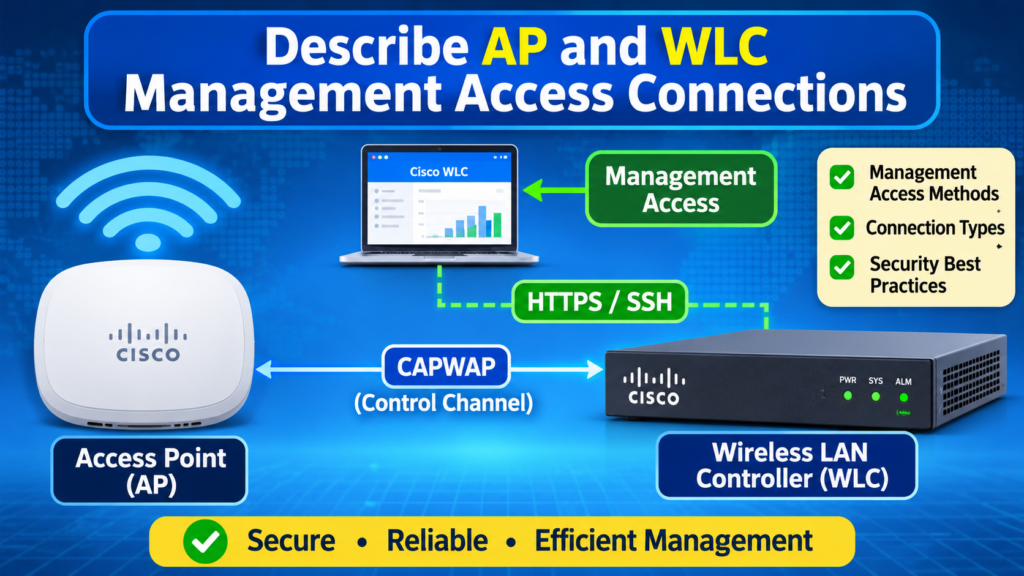
In Cisco wireless networks, Access Points (APs) and Wireless LAN Controllers (WLCs) must be managed securely and efficiently. Network administrators use different management access methods to configure, monitor, troubleshoot, and secure wireless devices.
Common AP and WLC management access methods include:
- Telnet
- SSH
- HTTP
- HTTPS
- Console Access
- TACACS+
- RADIUS
Telnet
Telnet is a network protocol that allows a user to remotely access and manage another computer or network device over a TCP/IP network using a command-line interface.
It uses TCP port 23 and sends data, including usernames and passwords, in plain text, making it less secure than SSH.
Definition
Telnet is a remote access protocol that enables users to connect to and control a remote device through a text-based interface over a network. Due to its lack of encryption, it has largely been replaced by SSH (Secure Shell) for secure remote access.
Example
To connect to a remote device:
telnet 192.168.1.1
This command attempts to establish a Telnet session with the device at IP address 192.168.1.1.
Uses of Telnet
- Remote administration of network devices
- Testing network connectivity and services
- Troubleshooting network issues
Disadvantages of Telnet
- No Encryption
- Telnet sends all data, including usernames and passwords, in plain text.
- Anyone intercepting the network traffic can read the information.
- Security Risks
- Vulnerable to packet sniffing, eavesdropping, and man-in-the-middle attacks.
- Attackers can steal login credentials and gain unauthorized access.
- No Authentication Protection
- Telnet does not provide strong mechanisms to verify the identity of the remote device.
- Data Can Be Modified
- Because communication is unencrypted, attackers may alter data being transmitted.
- Outdated Protocol
- Modern networks generally avoid Telnet in favour of SSH (Secure Shell), which encrypts all communication.
If a user logs in via Telnet:
Username: admin
Password: admin123
These credentials travel across the network as plain text and can potentially be captured by anyone monitoring the traffic.
SSH (Secure Shell)
SSH (Secure Shell) is a secure network protocol used to remotely access and manage computers, servers, and network devices over a network.
Unlike Telnet, SSH encrypts all communication, including usernames, passwords, and commands, making it much more secure.
Definition
SSH (Secure Shell) is a secure remote-access protocol that allows users to log in to and manage remote devices over a network through an encrypted connection, protecting data from unauthorized access.
Features of SSH
- Encrypts data transmission
- Secure remote login
- Protects against eavesdropping and data theft
- Supports secure file transfer (SCP and SFTP)
- Uses TCP port 22
Example
To connect to a remote device:
ssh admin@192.168.1.1
This command securely connects to the device with IP address 192.168.1.1 using the username admin.
Advantages over Telnet
| Telnet | SSH |
|---|---|
| No encryption | Encrypted communication |
| Uses TCP port 23 | Uses TCP port 22 |
| Less secure | Highly secure |
| Plain-text passwords | Encrypted passwords |
Configuration of SSH on Cisco Device
Switch(config)# ip domain-name example.com
Switch(config)# crypto key generate rsa
Switch(config)# username admin secret cisco123
Switch(config)# line vty 0 4
Switch(config-line)# transport input ssh
Switch(config-line)# login local
SSH Connection Example
ssh admin@192.168.1.10
HTTP (HyperText Transfer Protocol)
HTTP (HyperText Transfer Protocol) is an application-layer protocol used for communication between web browsers and web servers. It is the foundation of data exchange on the World Wide Web.
When you visit a website, your browser sends an HTTP request to the server, and the server responds with the requested web page or data.
Definition
HTTP is a protocol used for transferring web pages and data between a client (browser) and a web server. Its main limitation is that it transmits data without encryption, making it insecure for sensitive communications.
Example
http://www.example.com
Limitations of HTTP
- No Encryption
- Data is transmitted in plain text.
- Attackers can intercept and read sensitive information.
- Security Vulnerabilities
- Usernames, passwords, and personal data can be exposed.
- Vulnerable to eavesdropping and man-in-the-middle attacks.
- No Data Integrity Protection
- Data can be modified during transmission without detection.
- No Authentication
- HTTP alone does not verify the identity of the server or client.
To overcome these limitations, HTTPS (HyperText Transfer Protocol Secure) uses SSL/TLS encryption to secure communication between the browser and server.
HTTPS (HyperText Transfer Protocol Secure)
HTTPS is the secure version of HTTP. It uses SSL/TLS encryption to protect data exchanged between a web browser and a web server.
HTTPS ensures that information such as passwords, credit card details, and personal data cannot be easily intercepted or altered by attackers.
Definition
HTTPS (HyperText Transfer Protocol Secure) is a secure communication protocol that uses SSL/TLS encryption to protect data exchanged between web browsers and web servers, ensuring confidentiality, integrity, and authentication.
Features of HTTPS
- Encrypts data during transmission
- Authenticates the website’s identity using a digital certificate
- Ensures data integrity, preventing unauthorized modification
- Uses TCP port 443
Example
https://www.example.com
The padlock icon 🔒 in a browser’s address bar indicates that the website is using HTTPS.
Advantages of HTTPS
- Protects sensitive information.
- Prevents eavesdropping and man-in-the-middle attacks.
- Verifies that users are communicating with the intended website.
- Improves user trust and website security.
Console Access
Console access is a method of directly connecting to a network device (such as a router or switch) through its console port to configure, monitor, or troubleshoot the device.
It is typically used for the initial setup of a device before network connectivity is available.
Definition
Console access is the process of connecting directly to a network device through its console port to perform configuration, management, and troubleshooting tasks without relying on a network connection.
Features
- Direct physical connection to the device
- Does not require an IP address or network connection
- Used for configuration, maintenance, and troubleshooting
- Accessed using a console cable and terminal-emulation software
Example
A network administrator connects a PC to a router’s console port using a console cable and opens a terminal program to configure the router.
Common Command
Router>
This prompt appears after successfully accessing the router through the console.
TACACS+
TACACS+ is a security protocol used to provide Authentication, Authorization, and Accounting (AAA) services for network devices such as routers, switches, and firewalls.
It allows administrators to centrally manage user access and track user activities on network devices.
Definition
TACACS+ is a centralized AAA protocol that provides secure authentication, authorization, and accounting services for controlling and monitoring access to network devices.
Functions of TACACS+
- Authentication – Verifies the identity of a user.
- Authorization – Determines what actions the user is allowed to perform.
- Accounting – Records user activities for auditing and monitoring.
Features
- Encrypts the entire communication between the client and the TACACS+ server.
- Centralized user management.
- Commonly used in Cisco networks.
- Uses TCP port 49.
Example
When a network administrator logs in to a router:
- The router sends the login request to the TACACS+ server.
- The server verifies the username and password.
- The server determines the user’s permissions.
- The login activity is recorded.
RADIUS (Remote Authentication Dial-In User Service)
RADIUS is a networking protocol that provides Authentication, Authorization, and Accounting (AAA) services for users who connect to a network.
It is commonly used by organizations to centrally manage user logins for Wi-Fi networks, VPNs, routers, switches, and other network devices.
Definition
RADIUS (Remote Authentication Dial-In User Service) is a client-server protocol that provides centralized Authentication, Authorization, and Accounting (AAA) services for controlling and monitoring access to network resources.
Functions of RADIUS
- Authentication – Verifies the user’s identity.
- Authorization – Determines what resources the user can access.
- Accounting – Records user activities and connection details.
Features
- Centralized user management
- Widely used for Wi-Fi and VPN authentication
- Encrypts only the password field
- Uses UDP ports 1812 (authentication) and 1813 (accounting)
Example
When a user connects to a company’s Wi-Fi:
- The access point sends the login request to the RADIUS server.
- The RADIUS server verifies the username and password.
- Access is granted or denied.
- The user’s session details are recorded.
RADIUS vs TACACS+
| Feature | RADIUS | TACACS+ |
|---|---|---|
| Transport Protocol | UDP | TCP |
| Port | 1812/1813 | 49 |
| Encryption | Password only | Entire packet |
| Common Use | Wi-Fi, VPN | Router/Switch administration |
| Security | Good | More secure |
Best Practices for Secure Network Device Management
- Use SSH Instead of Telnet
- SSH encrypts all communication.
- Disable Telnet whenever possible.
- Use Strong Passwords
- Create complex passwords with letters, numbers, and special characters.
- Avoid default credentials.
- Implement AAA (Authentication, Authorization, Accounting)
- Use RADIUS or TACACS+ for centralized user management.
- Control and monitor user access.
- Enable Multi-Factor Authentication (MFA)
- Require a second form of verification for administrative access.
- Restrict Management Access
- Allow access only from trusted IP addresses or management networks.
- Use Access Control Lists (ACLs).
- Keep Software Updated
- Regularly update router, switch, and firewall firmware to patch security vulnerabilities.
- Use HTTPS for Web Management
- Avoid HTTP because it transmits data in plain text.
- Use HTTPS to encrypt web sessions.
- Disable Unused Services and Ports
- Turn off unnecessary protocols and services to reduce attack surfaces.
- Monitor and Log Activities
- Enable logging and regularly review logs for suspicious activity.
- Back Up Configurations
- Maintain secure backups of device configurations for quick recovery.
Verify Management Access Configuration
Verifying management access configuration means checking whether remote and local access methods (Console, SSH, Telnet, HTTPS) are correctly configured and secure on a network device.
Common Commands
1. Verify SSH Configuration
show ip ssh2. Verify Active SSH Connections
show ssh3. Verify VTY Line Configuration
show running-config | section line vty4. Verify Console Configuration
show running-config | section line con5. Verify User Accounts
show running-config | include username6. Verify HTTP/HTTPS Status
show ip http server statusExample
Router# show ip ssh

SSH Enabled - version 2.0
Authentication timeout: 120 secs
Authentication retries: 3
This output confirms that SSH version 2 is enabled.
What to Check
- SSH is enabled and Telnet is disabled.
- Strong passwords and usernames are configured.
- AAA (RADIUS/TACACS+) is working correctly.
- HTTPS is enabled instead of HTTP.
- Access is restricted using ACLs.
- Console and VTY lines require authentication.
Conclusion
Cisco AP and WLC management access methods provide multiple ways for administrators to securely manage wireless infrastructure. Telnet, SSH, HTTP, HTTPS, console access, TACACS+, and RADIUS each serve different management and security purposes.
Modern enterprise networks prefer secure protocols such as SSH, HTTPS, TACACS+, and RADIUS to protect management traffic and ensure centralized authentication and authorization.