Introduction to Cisco Wireless Architecture
In modern enterprise networking, wireless infrastructure is no longer just a luxury—it is the primary way users connect to applications, data, and the internet. To support everything from small branch offices to massive university campuses, Cisco has developed a flexible ecosystem of wireless architectures designed to balance scalability, ease of management, and reliability.
Cisco wireless architecture provides centralized and scalable wireless networking solutions for enterprise environments. Wireless networks allow devices such as laptops, smartphones, and tablets to connect to the network without physical cables.
What is Cisco Wireless Architecture
Cisco Wireless Architecture is the framework and design strategy used to connect wireless devices (like laptops, smartphones, and IoT equipment) to a wired corporate network using Cisco hardware and software.
To handle enterprise traffic, every wireless network must manage two distinct types of data:
- The Control Plane: The management tasks, such as setting Wi-Fi passwords, enforcing security policies, managing channels, and handling roaming.
- The Data Plane: The actual user traffic, like browsing a website, sending an email, or making a video call.
Types of Cisco Wireless Architecture
Cisco wireless networks mainly operate using different deployment architectures depending on organizational requirements.
- Autonomous Wireless Architecture
- Controller-Based Wireless Architecture
- Cloud-Based Wireless Architecture
1. Autonomous Wireless Architecture
Cisco Autonomous Wireless Architecture is a traditional wireless network architecture where each Access Point (AP) operates independently and is configured individually. There is no Wireless LAN Controller (WLC) to centrally manage the APs.
Key Characteristics of autonomous wireless architecture
- Independent Operation:
- In an autonomous wireless architecture, each access point operates independently and makes its own forwarding and management decisions.
- Local Configuration Storage:
- The configuration of each access point is stored locally on the device rather than on a centralized controller.
- No Wireless LAN Controller Required:
- Autonomous access points do not require a Wireless LAN Controller (WLC) for operation or management.
- Individual Management:
- Each access point must be configured, monitored, and maintained separately through a web interface or command-line interface.
- Local Traffic Forwarding:
- Client traffic is processed and forwarded directly by the access point without the involvement of a central controller.
- Distributed Intelligence:
- Functions such as authentication, security enforcement, and radio resource management are performed locally by each access point.
- Limited Scalability:
- As the number of access points increases, network management becomes more complex because configurations must be applied individually.
- Suitable for Small Networks:
- Autonomous wireless architecture is best suited for small offices and environments with a limited number of access points.
- Independent Software Upgrades:
- Firmware and software updates must be installed separately on each access point.
- Basic Roaming Support:
- Wireless clients can roam between access points, but the roaming process is generally less efficient than in controller-based wireless networks.
2. Controller-Based Wireless Architecture
Controller-based wireless architecture is a centralized wireless network design in which multiple lightweight access points (APs) are managed by a wireless LAN controller (WLC). The controller handles network management, security, configuration, and roaming, while the APs primarily provide wireless connectivity to users.
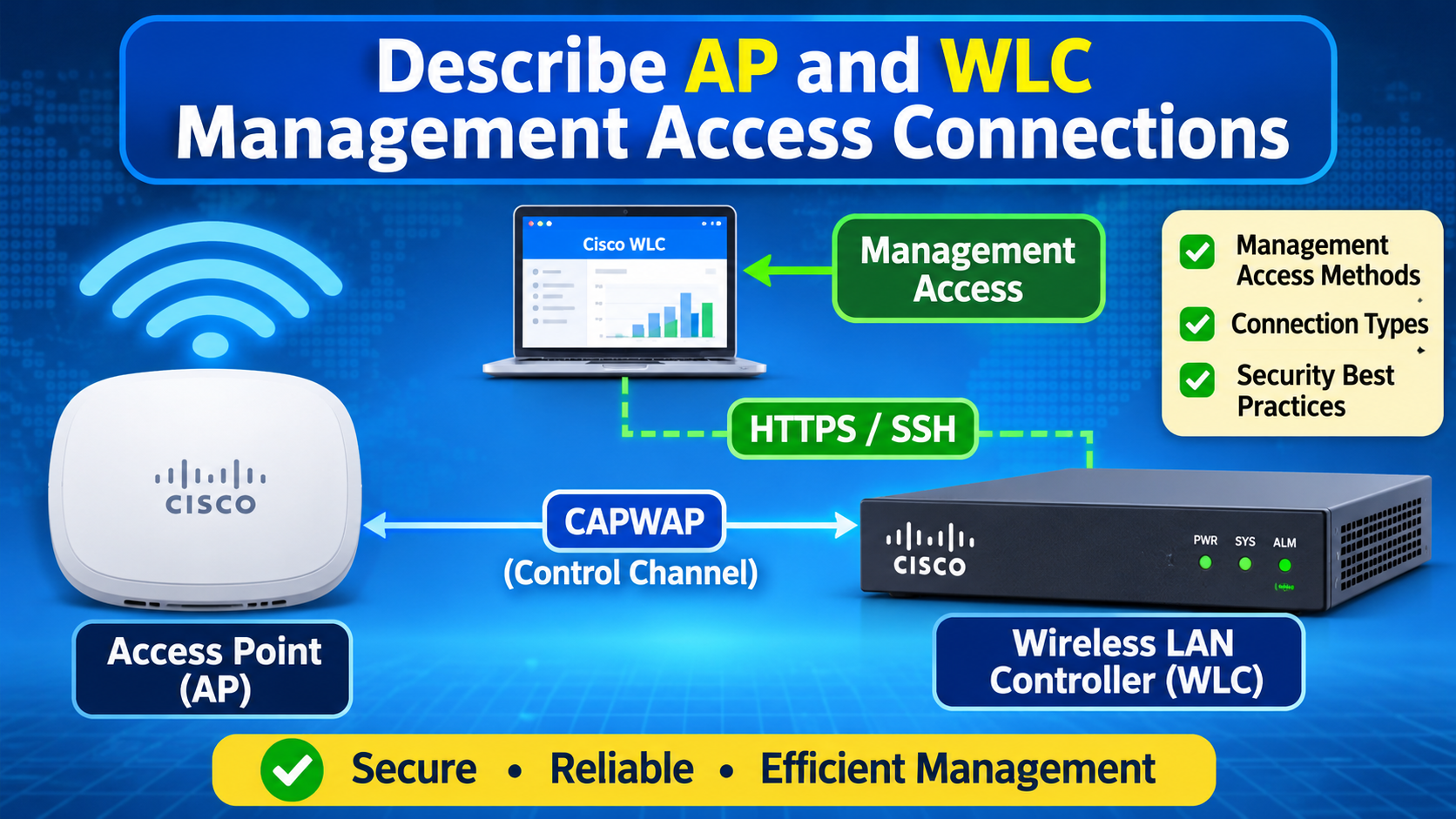
In this architecture, lightweight APs are deployed throughout the network and connected to the WLC through the wired infrastructure. When a wireless client connects, the AP forwards control information to the controller. Depending on the deployment mode, user traffic may also pass through the controller using a CAPWAP (Control and Provisioning of Wireless Access Points) tunnel. The controller applies policies, authentication, Quality of Service (QoS), and security features centrally, making management easier and more scalable.
Components of Controller-Based Wireless Architecture
- Wireless LAN Controller (WLC)
- WLC is the centralized management device.
- It is a physical appliance, virtual machine, or cloud-based service that sits centrally in the network.
- It handles configuration, security policies, authentication, and radio resource management (RRF).
- It supports seamless roaming and policy enforcement.
- Lightweight Access Points (LAPs)
- Lightweight AP provides wireless connectivity to end devices.
- It receives configuration and software updates from the WLC.
- It forwards control traffic to the controller through CAPWAP tunnels.
- Wireless Clients
- These are the wireless end devices such as laptops, smartphones, and tablets that connect to the wireless network.
- Switches and Distribution Network
- They provide connectivity between APs and the controller.
- They also carry both wired and wireless traffic.
How Controller-Based Wireless Architecture Works
- When a lightweight AP is powered on, it obtains an IP address through DHCP and discovers the wireless LAN controller using methods such as DHCP, DNS, broadcast, or manually configured information.
- Once the controller is located, the AP establishes a secure CAPWAP control tunnel with the WLC and downloads its configuration and software settings.
- After the AP joins the controller, it begins broadcasting the configured SSIDs. Wireless clients can then connect to the AP.
- During the connection process, the controller handles authentication, applies security policies, and manages Quality of Service (QoS).
- Depending on the deployment mode, client data traffic may either be tunneled through the WLC (centralized switching) or forwarded directly to the local network (local switching).
- As users move from one AP coverage area to another, the controller coordinates the handoff process, providing seamless roaming without interrupting network connectivity.
- The WLC also continuously monitors RF conditions and automatically adjusts channel and power settings to optimize wireless performance.
What is a CAPWAP Tunnel?
CAPWAP (Control and Provisioning of Wireless Access Points) is a protocol used in controller-based wireless architectures to establish a secure communication tunnel between a Lightweight Access Point (LAP) and a Wireless LAN Controller (WLC). Through this tunnel, the controller manages and configures the access point remotely.
A CAPWAP tunnel consists of two logical channels:
- Control Tunnel
- Carries management and control information between the AP and the WLC.
- Used for AP discovery, configuration, software updates, authentication, and RF management.
- Encrypted using DTLS (Datagram Transport Layer Security) for secure communication.
- Uses UDP port 5246.
- Data Tunnel
- Carries user traffic (wireless client data) between the AP and the WLC.
- Used in centralized switching deployments where client traffic is tunneled to the controller.
- Uses UDP port 5247.
- May or may not be encrypted, depending on the implementation and configuration.
How a CAPWAP Tunnel Works
- The lightweight AP powers on and obtains an IP address.
- The AP discovers the Wireless LAN Controller (WLC).
- The AP establishes a secure CAPWAP control tunnel with the WLC.
- The WLC authenticates the AP and downloads its configuration.
- If centralized switching is used, a CAPWAP data tunnel is created to carry client traffic.
- Wireless clients connect to the AP, and their traffic is forwarded according to the configured mode.
Cisco Access Point (AP) Modes
Cisco Access Points (APs) can operate in different modes depending on the network requirements. Each mode determines how the AP handles wireless traffic and interacts with the Wireless LAN Controller (WLC).
1. Local Mode (Default Mode)
In Local Mode, the AP provides wireless connectivity to clients and tunnels both control and data traffic to the WLC using CAPWAP. This is the most commonly used mode in enterprise WLAN deployments.
Characteristics:
- Default mode for lightweight APs.
- Supports client access.
- Centralized switching through the WLC.
- Provides seamless roaming and RF management.
2. FlexConnect Mode
In FlexConnect Mode, the AP can locally switch client traffic instead of tunneling it to the WLC. It is commonly used in branch offices connected to a central controller over a WAN.
Characteristics:
- Supports local switching and central authentication.
- Continues to serve clients even if the WAN connection to the WLC fails.
- Reduces WAN bandwidth usage.
- Ideal for remote branch offices.
3. Monitor Mode
In Monitor Mode, the AP does not serve wireless clients. Instead, it continuously scans RF channels to detect interference, rogue APs, and security threats.
Characteristics:
- No client association.
- Performs RF monitoring and intrusion detection.
- Detects rogue devices and attacks.
- Improves WLAN security.
4. Sniffer Mode
In Sniffer Mode, the AP captures wireless packets and forwards them to a packet analyzer such as Wireshark running on a remote computer.
Characteristics:
- Used for troubleshooting and packet analysis.
- Does not provide client access.
- Captures and forwards 802.11 traffic.
5. Rogue Detector Mode
A Rogue Detector AP listens to traffic on the wired network to identify unauthorized wireless devices connected to the network.
Characteristics:
- Detects rogue access points.
- Enhances network security.
- Does not provide wireless services.
6. Bridge Mode
Bridge mode is used to create a point-to-point or point-to-multipoint wireless connection between two or more locations.
Characteristics:
- Connects separate LANs wirelessly.
- Supports outdoor deployments.
- Commonly used between buildings.
Types:
- Point-to-Point Bridge
- Point-to-Multipoint Bridge
7. Mesh Mode
In Mesh Mode, APs communicate wirelessly with each other to extend coverage without requiring Ethernet cabling to every AP.
Characteristics:
- Suitable where cabling is difficult.
- Consists of:
- Root AP (RAP)
- Mesh AP (MAP)
- Commonly used in campuses, warehouses, and outdoor environments.
8. SE-Connect Mode (Spectrum Expert Connect)
In SE-Connect Mode, the AP acts as a spectrum analyzer and sends RF data to Cisco Spectrum Expert software.
Characteristics:
- Advanced RF troubleshooting.
- Detects non-Wi-Fi interference sources.
- Requires Cisco Spectrum Expert software.
Conclusion
Cisco wireless architectures provide flexible, scalable, and secure wireless networking solutions for modern enterprises. Understanding autonomous, controller-based, cloud-managed, and SD-Access architectures helps network administrators design efficient wireless networks.