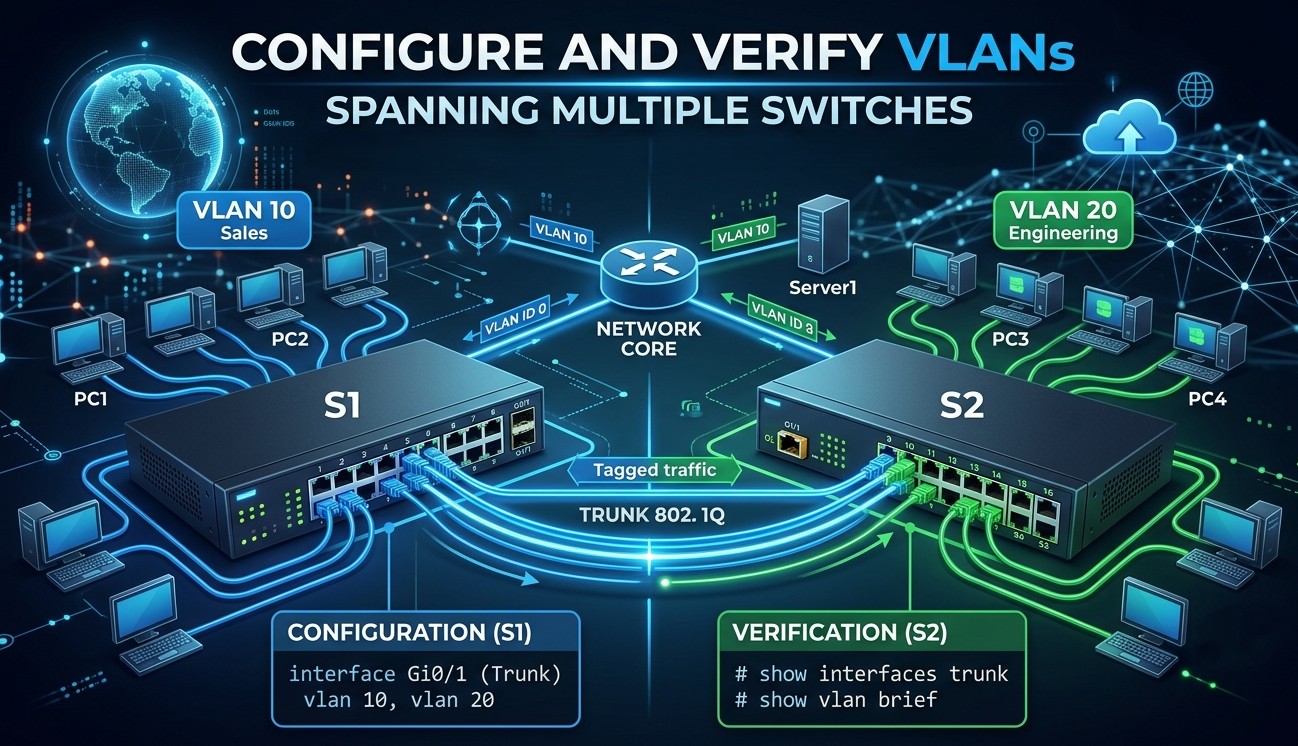
Configure and Verify VLANs spanning multiple switches
In a switched network, devices are often grouped based on departments, functions, or security requirements. A VLAN (Virtual Local Area Network) allows a network administrator to logically divide a physical network into multiple separate broadcast domains.
This topic covers the configuration and verification of VLANs across multiple switches
What is a VLAN?
A VLAN (Virtual Local Area Network) is a technology that allows a network administrator to logically divide a single physical network into multiple independent networks.
Normally, when devices are connected to a switch, they belong to the same broadcast domain and can communicate directly with one another. A VLAN creates logical boundaries within the switch, making devices in different VLANs behave as if they are connected to completely separate physical switches, even though they share the same hardware.
Why VLANs are needed
The VLAN is essentially needed in order to
- To improve security by separating users and departments into different logical networks, preventing unnecessary access to sensitive resources.
- To reduce broadcast traffic by limiting broadcasts to devices within the same VLAN, which improves network performance.
- To create separate broadcast domains without requiring additional physical switches.
- To logically group users based on department, function, or project, regardless of their physical location.
- To simplify network management by allowing administrators to move, add, or change users through configuration rather than rewiring.
- To improve scalability by making it easier to organize and expand large networks.
- To separate different types of traffic, such as data traffic and voice traffic, for better control and quality of service.
- To reduce network congestion by keeping unnecessary traffic within its designated VLAN.
- To lower infrastructure costs by allowing multiple logical networks to operate on the same physical switching hardware.
- To support organizational policies by isolating departments such as HR, Finance, and Engineering into separate network segments.
Access Port
An access port is a switch port that carries traffic for only one VLAN. Devices such as computers, printers, IP phones, and servers are typically connected to access ports. Frames received on an access port are associated with a single VLAN, and the connected device does not need to understand VLAN tagging.
Trunk Port
A trunk port is a switch port that carries traffic for multiple VLANs over a single physical link. Trunk ports are commonly used between switches, between a switch and a router, or between a switch and a server that supports VLANs. VLAN information is carried using IEEE 802.1Q tagging.
Understanding VLANs with Examples
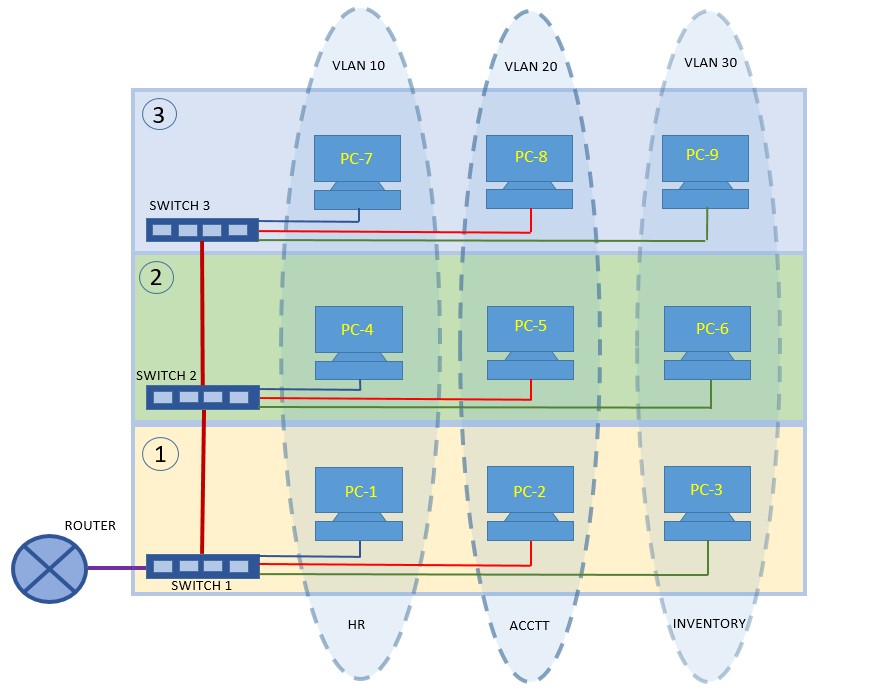
The company has a three-floor building where different departments—HR, Accounts, and Inventory—are spread across all floors.
- HR department is assigned VLAN 10
- The account department is assigned VLAN 20
- The inventory department is assigned VLAN 30.
Each floor has a switch, and end devices (PCs) belonging to different departments are connected to the switch on that floor. Even though the devices of the same department are physically located on different floors, they must behave as if they are on the same local network.
This is achieved by configuring VLANs consistently on all three switches and using trunk links between the switches.
Basic VLAN Configuration Steps and Guides
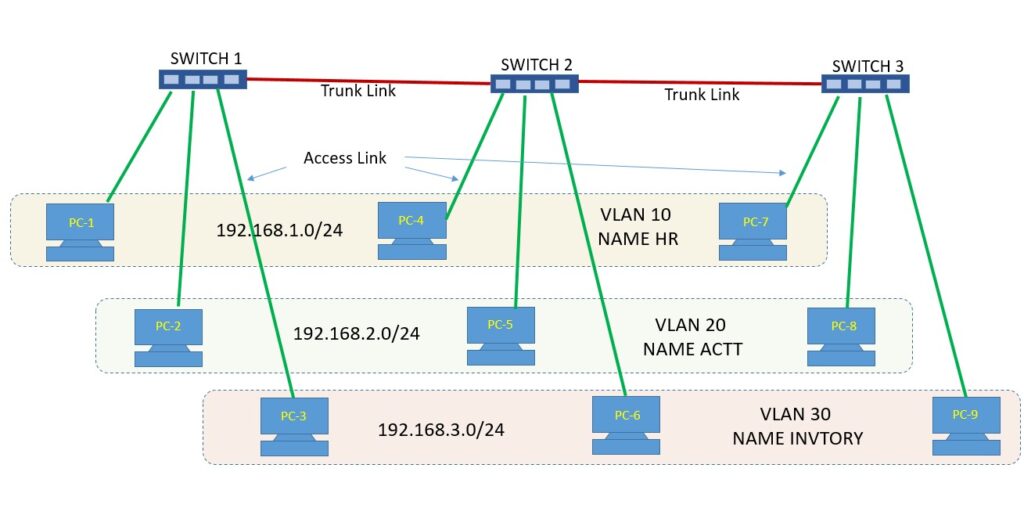
Step 1: Plan VLAN according to your network topology.
- Determine VLAN ID that ranges from 1 to 4094. Generally, VLAN 1 is not used, and describe the VLAN name.
- The following parameters need to be configured for all the PCs.
| PC | Department | VLAN | IP Address | Connect with the switch port |
| PC-1 | HR | VLAN 10 | 192.168.1.2/24 | Switch 1 – Fa0/1 |
| PC-2 | HR | VLAN 10 | 192.168.1.3/24 | Switch 1 – Fa0/2 |
| PC-3 | HR | VLAN 10 | 192.168.1.4/24 | Switch 1 – Fa0/3 |
| PC-4 | ACCTT | VLAN 20 | 192.168.2.2/24 | Switch 2 – Fa0/1 |
| PC-5 | ACCTT | VLAN 20 | 192.168.2.3/24 | Switch 2 – Fa0/2 |
| PC-6 | ACCTT | VLAN 20 | 192.168.2.4/24 | Switch 2 – Fa0/3 |
| PC-7 | INVENTORY | VLAN 30 | 192.168.3.2/24 | Switch 3 – Fa0/1 |
| PC-8 | INVENTORY | VLAN 30 | 192.168.3.3/24 | Switch 3 – Fa0/2 |
| PC-9 | INVENTORY | VLAN 30 | 192.168.3.4/24 | Switch 3 – Fa0/3 |
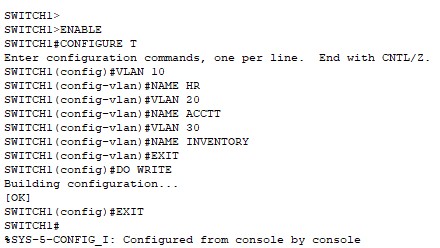
Step 2: Create a VLAN for the respective department.
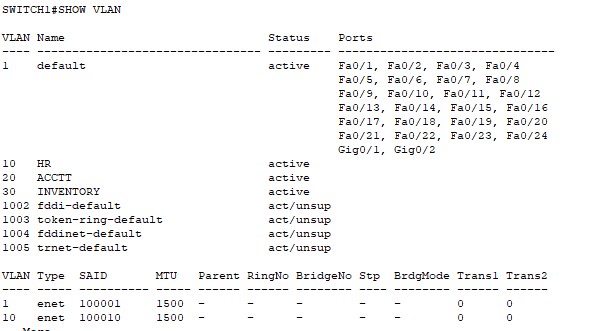
In our case, VLAN 10 is for the HR department, VLAN 20 for ACCTT, and VLAN 30 for the inventory department.
- Cisco CLI Command to create VLANs
- CLI Command to verify VLAN creation
Step 3: Assign Access Ports to VLANs
The next step is to assign switch port access to respective VLANs.
- Cisco CLI Command to assign access ports to VLANs
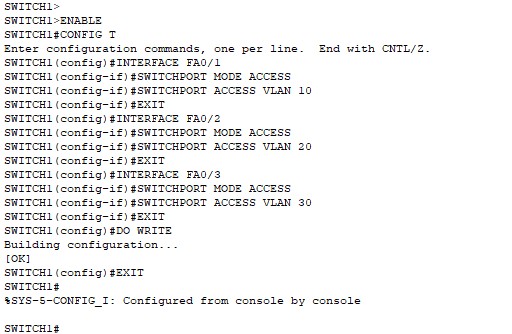
- Now, run the “SHOW VLAN” command to verify whether access ports are assigned to VLANs or not.
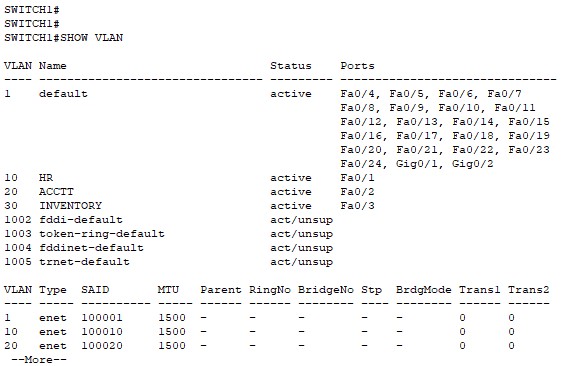
Step 3: Configure Trunk ports
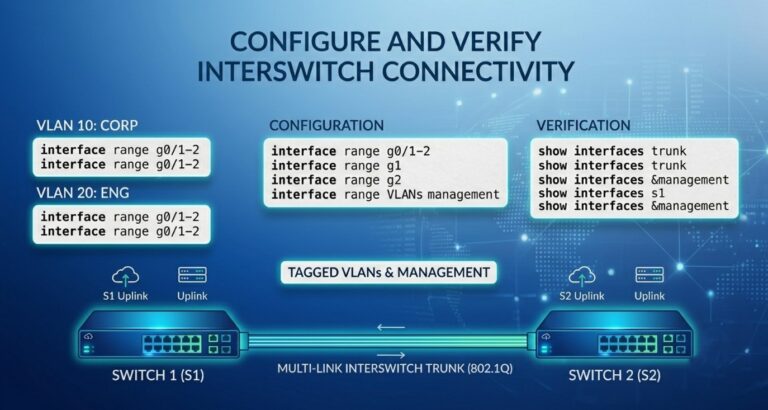
- The interface GigabitEthernet 0/1 of Switch is connected to the interface GigabitEthernet 0/1 of Switch 2.
- The trunk link is established between the switches to carry traffic for multiple VLANs over a single link.
- VLANs 10, 20, and 30 are allowed on the trunk, and VLAN 99 is configured as the native VLAN to handle untagged traffic.
- This trunk link enables communication between network devices while maintaining VLAN separation.
The Cisco command line to configure trunk ports is as follows.
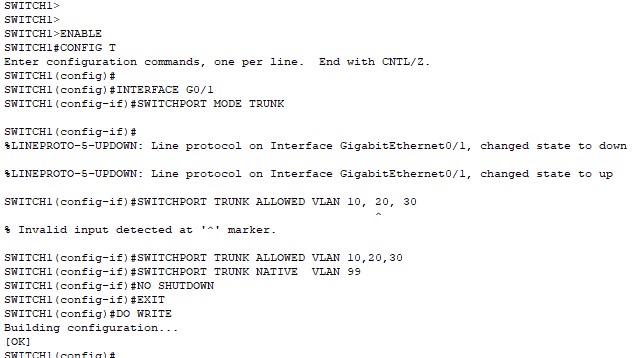
Trunk port configuration can be verified by using the “SHOW INTERFACE TRUNK” command.
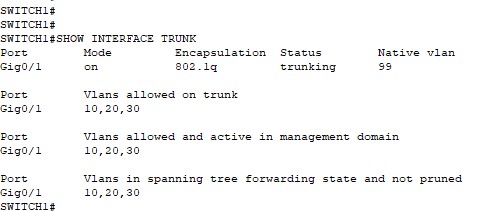
Types of VLANs
- 1. Default VLAN
- Every switch port belongs to the default VLAN when the switch is first powered on.
- On most Cisco switches, VLAN 1 is the default VLAN.
- All ports are members of VLAN 1 until they are assigned to another VLAN.
- Example: VLAN 1
- 2. Data VLAN
- Used to carry normal user-generated traffic.
- Separates user data from management and voice traffic.
- Improves security and network organization.
- Example: VLAN 10 for the Sales Department, VLAN 20 for the HR Department.
- 3. Management VLAN
- Used for remote management of network devices.
- Administrators can access switches, routers, and other devices through this VLAN.
- Typically used for SSH, Telnet, SNMP, and monitoring.
- Example: VLAN 99
- 4. Native VLAN
- Used on trunk ports to carry untagged traffic.
- All untagged frames received on a trunk port are assigned to the native VLAN.
- The native VLAN must match on both ends of a trunk link.
- Example: VLAN 99 configured as the native VLAN.
- 5. Voice VLAN
- Dedicated VLAN for IP phone traffic.
- Separates voice traffic from data traffic.
- Helps maintain call quality through Quality of Service (QoS).
- Example: VLAN 150 for IP phones.
- 6. Security VLAN (Private VLAN)
- Used to restrict communication between devices within the same VLAN.
- Commonly used in hotels, data centers, and service provider networks.
- Enhances security by isolating hosts.