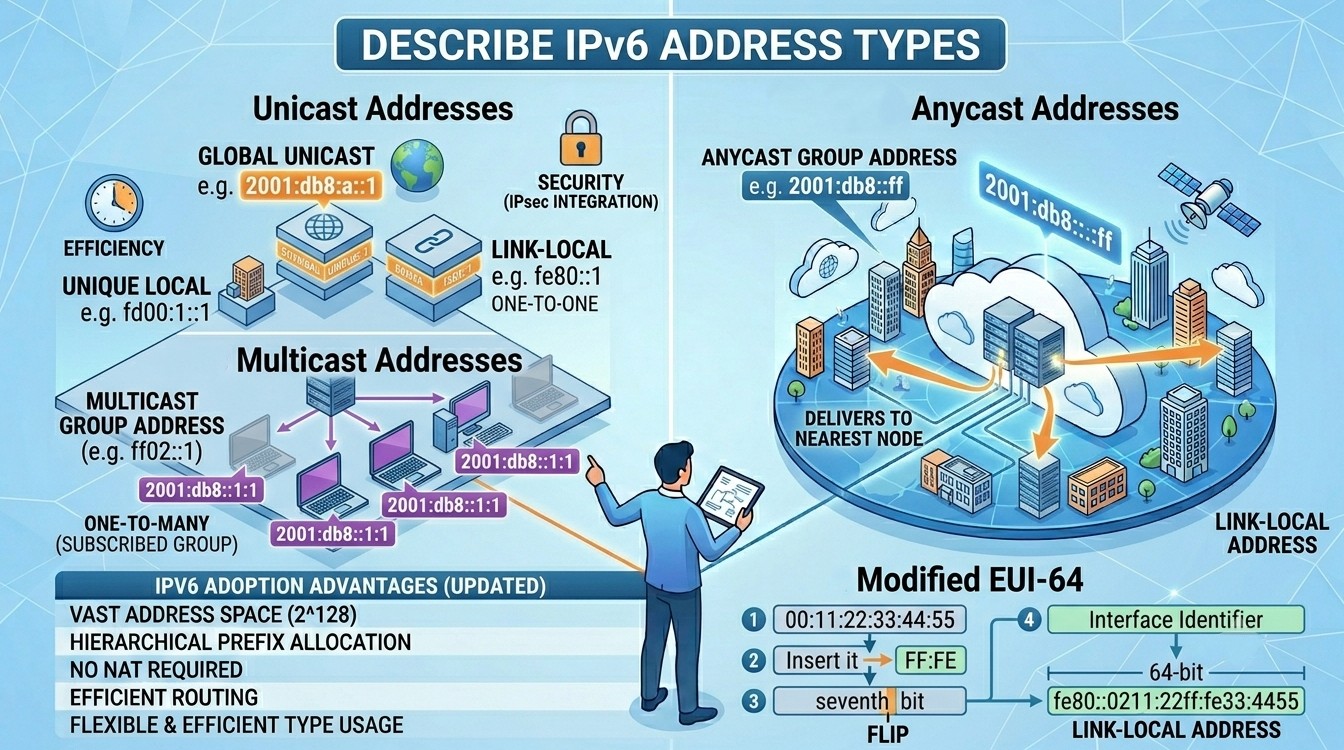
IPv6 Address Types
Introduction
The rapid growth of internet-connected devices has made the limitations of IPv4 increasingly apparent. To address the shortage of available IP addresses and improve network efficiency, Internet Protocol Version 6 (IPv6) was developed. IPv6 uses 128-bit addresses, providing approximately 340 undecillion unique addresses, which is enough to support the continued expansion of the Internet, cloud computing, mobile networks, and the Internet of Things (IoT).
One of the key concepts in IPv6 networking is the classification of address types. IPv6 defines several address categories that determine how packets are delivered across networks. These address types include Unicast, Anycast, and Multicast addresses. Additionally, IPv6 supports automatic address generation techniques such as Modified EUI-64, which simplifies network configuration.
Understanding IPv6 Addressing
Unlike IPv4, which primarily uses unicast, broadcast, and multicast communication, IPv6 eliminates broadcast traffic entirely and replaces it with more efficient multicast mechanisms. IPv6 addresses are written as eight groups of four hexadecimal digits separated by colons.
Example:
2001 : 0db8 : 85a3 : 0000 : 0000 : 8a2e : 0370 : 7334
Compressed format:
2001 : db8 : 85a3 : : 8a2e : 370 : 7334
IPv6 addresses are generally divided into two sections:
- Network Prefix (first 64 bits)
- Interface Identifier (last 64 bits)
The address type determines how the address is used and how traffic is delivered.
Types of IPv6 Address
IPv6 addresses are categorized into three main types based on how data is routed:
- Unicast
- Multicast
- Anycast.
1. Unicast Addresses
A Unicast address identifies a single, specific interface on a network. A packet sent to a unicast address is delivered to that specific interface only. This is the most common type of address.
There are several subtypes of unicast addresses:
- Global Unicast Address (GUA): It is equivalent to a public IPv4 address. These are globally routable on the internet.
- Prefix: Typically starts with
2000::/3(any address starting with a2or a3).
- Prefix: Typically starts with
- Link-Local Address: It is used for communication within a single local network segment (subnet). They are not routable on the wider internet. Every IPv6-enabled interface automatically configures a link-local address.
- Prefix:
fe80::/10
- Prefix:
- Unique Local Address (ULA): Equivalent to private IPv4 addresses (like
192.168.x.x). They are used for local communication within an organization or site but are not routable on the public internet.- Prefix:
fc00::/7(commonly seen asfd00::/8).
- Prefix:
- Loopback Address: Used by a host to send packets to itself for testing.
- Address:
::1/128
- Address:
- Unspecified Address: Used as a placeholder when a device does not yet have a valid IPv6 address (e.g., during initialization).
- Address:
::/128
- Address:
2. Multicast Addresses
A Multicast address identifies a group of interfaces, typically belonging to different nodes. When a packet is sent to a multicast address, a copy of the packet is delivered to every interface belonging to that group.
IPv6 completely replaces IPv4 broadcasting with multicast to reduce unnecessary network traffic.
- Prefix: Always starts with
ff00::/8 - Examples:
ff02::1– All nodes on the local link.ff02::2– All routers on the local link.
3. Anycast Addresses
An Anycast address is assigned to multiple interfaces (usually belonging to different nodes). However, when a packet is sent to an anycast address, it is delivered to only one interface—the one that is “closest” according to the network’s routing protocols.
Anycast is highly useful for load balancing and content delivery networks (CDNs).
- Prefix: Anycast addresses use the exact same address structure as Global Unicast addresses. They are distinguished simply by being injected into the routing protocol as an anycast destination.
Comparison
| Address Type | Target Destination | Scope / Common Use Case | Common Prefix |
|---|---|---|---|
| Global Unicast | One specific device | Public Internet communication | 2000::/3 |
| Link-Local | One specific device | Local subnet only (automatic) | fe80::/10 |
| Unique Local | One specific device | Internal private networks | fd00::/8 |
| Multicast | Multiple devices | One-to-many communication | ff00::/8 |
| Anycast | Nearest of multiple devices | Load balancing / DNS servers | Same as Global Unicast |
Modified EUI-64
The Modified EUI-64 (Extended Unique Identifier) format is a method used in IPv6 to automatically configure a unique 64-bit interface identifier (the host portion of an IPv6 address).
It does this by taking a device’s existing 48-bit MAC address (which is globally unique to the network hardware) and expanding it into a 64-bit identifier.
How the Conversion Works
The conversion happens in two distinct steps:
Step 1: Insert FF:FE in the Middle
- A standard MAC address is 48 bits (12 hex digits). An IPv6 interface ID needs to be 64 bits (16 hex digits). To fill the 16-bit gap, the hex value
FFFEis inserted directly into the exact middle of the MAC address (between the Organizationally Unique Identifier (OUI) and the vendor-specific extension).
Step 2: Flip the 7th Bit (Universal/Local Bit)
- The 7th bit of the first byte of the MAC address is called the U/L (Universal/Local) bit.
- In a standard MAC address, a
0means globally unique (assigned by the IEEE), and a1means locally administered. - In IPv6, this logic is inverted for easier readability. A
1signifies a universal/global scope. Therefore, the 7th bit is flipped (if it’s0, it becomes1; if it’s1, it becomes0).
- In a standard MAC address, a
Step-by-Step Example
Let’s convert a real-world MAC address into a Modified EUI-64 interface ID.
- Target MAC Address:
00:12:7F:A1:4C:55
Step 1 : Insert FF:FE
- Split the MAC address in half and insert
FF:FEin the middle:
00:12:7F+FF:FE+A1:4C:55=0012:7FFF:FEA1:4C55
Step 2: Flip the 7th Bit
- Look at the first byte (the first two hex digits), which is
00. Let’s convert that first byte into binary to find the 7th bit:
0=00000=0000- Combined First Byte (Binary):
0 0 0 0 0 0 0 0
Now, count to the 7th bit from the left and flip it from 0 to 1:
- Before:
0 0 0 0 0 0 0 0 - After:
0 0 0 0 0 0 1 0
Convert this binary back into hex:
0000=00010=2- New First Byte (Hex):
02
Step 3: Final Result
Replace the original first byte (00) with the modified first byte (02):
0212:7FFF:FEA1:4C55
If this device were on a network with a prefix of 2001:db8:1:1::/64, its full IPv6 address would automatically become:
Quick Hex Cheat Sheet for Flipping the 7th Bit
Because binary conversion can be tedious, you can use this shortcut for the second hex digit of the address. Flipping the 7th bit will always follow this predictable pattern:
| Original 2nd Hex Digit | Becomes… |
| 0 | 2 |
| 1 | 3 |
| 4 | 6 |
| 8 | A |
| C | E |
Why Modified EUI-64 is Used
- Stateless Address Autoconfiguration (SLAAC): It allows devices to connect to an IPv6 network and generate their own unique IP address instantly without needing a DHCP server.
- Guaranteed Uniqueness: Because MAC addresses are globally unique, the resulting IPv6 address is almost guaranteed to be unique on the local link.
⚠️ A Note on Privacy: Because EUI-64 bases the IP address permanently on the hardware MAC address, it makes it easy to track a device across different networks. Because of this privacy concern, modern operating systems (like Windows, macOS, and iOS) often prefer IPv6 Privacy Extensions (RFC 4941), which generate randomized, temporary interface IDs instead of using EUI-64 by default.
Conclusion
IPv6 introduces a flexible and efficient addressing architecture that supports the future growth of global networking. Unicast addresses enable one-to-one communication, with Global Unicast, Unique Local, and Link-Local addresses serving different purposes. Anycast improves availability and performance by directing traffic to the nearest destination, while Multicast enables efficient one-to-many communication without relying on broadcasts.
Modified EUI-64 simplifies address assignment by automatically generating interface identifiers from MAC addresses, although modern privacy-focused alternatives are increasingly preferred.