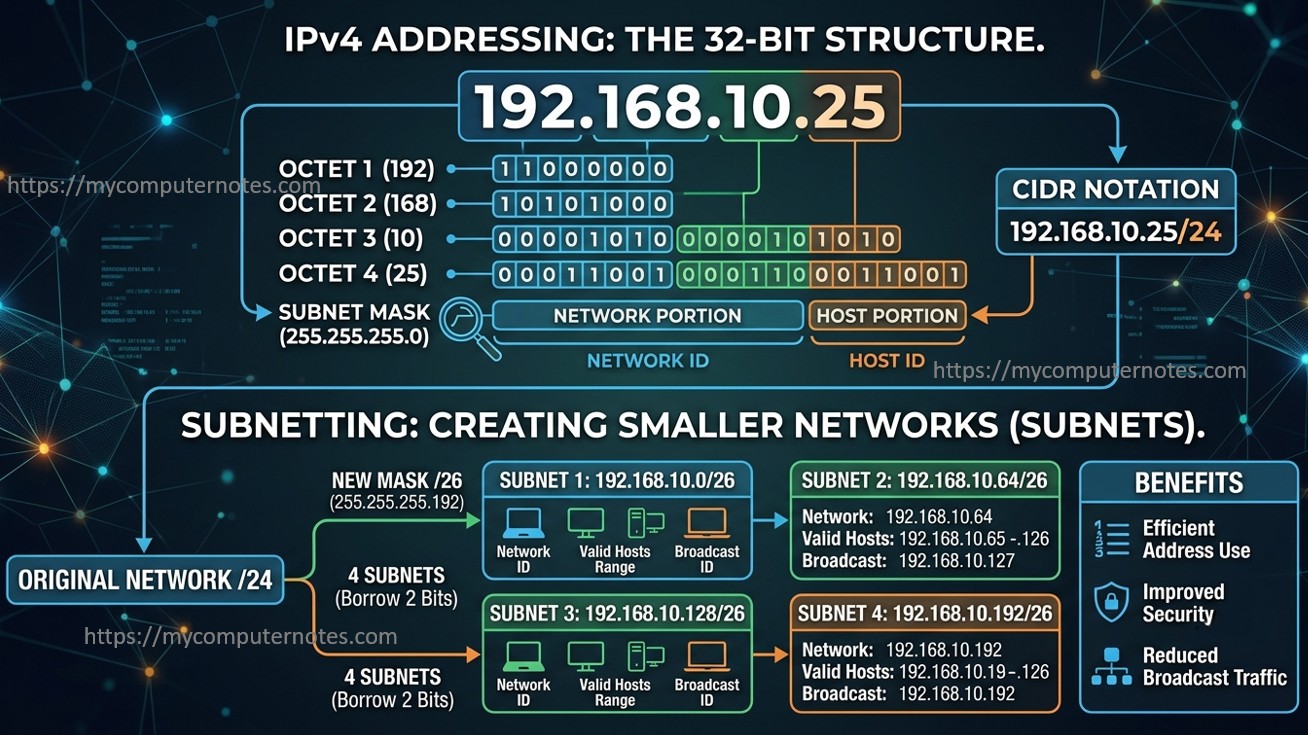
IPv4 Addressing and Subnetting
Introduction
Every time you browse a website, send an email, stream a video, or connect to a Wi-Fi network, a complex communication process takes place behind the scenes. One of the most important components that makes this communication possible is the Internet Protocol (IP) address. Just as every house has a unique postal address for receiving mail, every device connected to a network requires a unique IP address to send and receive data.
Among the various networking concepts, IPv4 addressing and subnetting form the backbone of modern computer networks. Understanding these concepts is essential for networking professionals, IT students, cybersecurity enthusiasts, and anyone interested in how the internet works.
This article explores IP addressing, the history and types of IP addresses, the structure of IPv4, IP address classes, and the concept of subnetting.
What is an IP Address?
An Internet Protocol (IP) address is a unique numerical identifier assigned to a device connected to a network that uses the Internet Protocol for communication. It serves two primary purposes:
- Identification – Identifies a specific device on a network.
- Location Addressing – Helps route data packets to the correct destination.
Without IP addresses, devices would not be able to communicate with each other over local networks or the internet.
For example, when you type a website address into your browser, your computer uses IP addresses to locate and communicate with the web server hosting that website.
A Brief History of IP Addressing
The concept of IP addressing emerged during the development of the internet in the 1970s. As computer networks began to expand, researchers needed a standardized method to identify and connect devices across different networks.
In 1981, the Internet Engineering Task Force (IETF) officially introduced IPv4 through RFC 791. At the time, the available address space seemed more than sufficient for future growth.
However, the rapid expansion of the internet, smartphones, cloud computing, and IoT devices led to an increasing demand for IP addresses. This eventually resulted in IPv4 address exhaustion, prompting the development of IPv6 as a long-term solution.
Today, both IPv4 and IPv6 coexist, with IPv4 still being the most widely used protocol worldwide.
Types of IP Addresses
Internet Protocol addresses are primarily categorized into two versions:
1. IPv4 (Internet Protocol Version 4)
IPv4 is the fourth version of the Internet Protocol and remains the most commonly used addressing system.
Key Characteristics of IPv4 Address
- An IPv4 address is a 32-bit logical address used to uniquely identify devices on a network.
- It is typically represented in dotted-decimal notation, making it easier for humans to read and understand.
- The 32 bits are divided into four equal sections called octets, with each octet consisting of 8 bits.
- The four octets are separated by periods (dots). For example: 192.168.1.10.
- Each octet can have a decimal value ranging from 0 to 255.
- Although commonly written in decimal format, every IPv4 address is internally processed in binary format by networking devices.
- For example, the IPv4 address 192.168.1.10 can be represented in binary as 11000000.10101000.00000001.00001010.
- An IPv4 address consists of two main parts:
- Network Portion – Identifies the network to which the device belongs.
- Host Portion – Identifies the specific device within that network.
- The boundary between the network and host portions is determined by the subnet mask or CIDR notation.
- IPv4 supports approximately 4.3 billion unique addresses (2³² addresses).
- IPv4 addresses can be assigned statically (manually configured) or dynamically through a DHCP server.
- IPv4 remains the most widely used addressing scheme despite the growing adoption of IPv6.
2. IPv6 (Internet Protocol Version 6)
IPv6 was developed to overcome the address limitations of IPv4.
Key Characteristics of IPv6
- An IPv6 address is a 128-bit logical address used to uniquely identify devices on a network.
- It was developed to overcome the address limitations of IPv4 and support the growing number of internet-connected devices.
- IPv6 addresses are represented in hexadecimal notation, using numbers (0–9) and letters (A–F).
- The 128 bits are divided into eight groups of 16 bits, known as hextets. The eight hextets are separated by colons (:).
- A typical IPv6 address appears as:
- 2001:0db8:85a3:0000:0000:8a2e:0370:7334
- Leading zeros within a hextet can be omitted to simplify the address.
- Consecutive groups of zeros can be compressed using a double colon (::), but only once in an address.
- IPv6 provides an extremely large address space, supporting approximately 3.4 × 10³⁸ unique addresses. An IPv6 address generally consists of two main parts:
- Network Prefix – Identifies the network.
- Interface Identifier – Identifies a specific device or interface on the network.
- IPv6 eliminates the need for widespread use of Network Address Translation (NAT) due to its vast address availability.
- It supports automatic address configuration (SLAAC), allowing devices to configure their own addresses without requiring a DHCP server.
- IPv6 includes built-in support for multicast communication, improving network efficiency.
- It offers enhanced security features through support for IPsec, which provides authentication and encryption capabilities.
- IPv6 improves routing efficiency by using a simplified header structure compared to IPv4.
IPv4 Address Format
An IPv4 address is composed of 32 bits divided into four sections called octets. Each octet has a length of 8 bits.
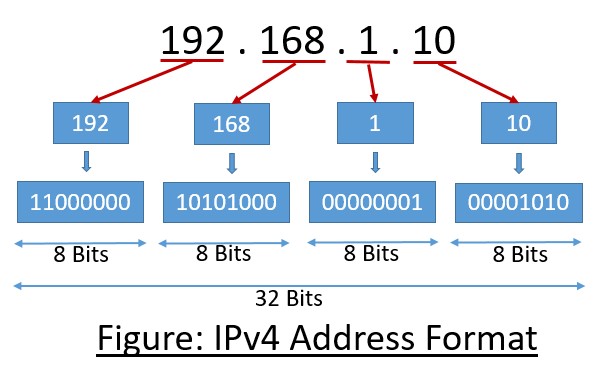
Let us understand with the help of an example.
IP Address = 192.168.1.10
The IP address above consists of 4 sections. Each section is called an octet. Each octet has a length of 8 bits and can range 0 to 255 decimal numbers
The above IP address in binary notation is represented as 11000000.10101000.0000001.00001010
An IP address is divided into two logical components:
- Network ID (Network Portion) – Identifies the network to which the device belongs.
- Host ID (Host Portion) – Identifies the specific device (host) within that network.
A subnet mask is used to determine which part of an IP address represents the network and which part represents the host.
Example:
IP Address: 192.168.1.10
Subnet Mask: 255.255.255.0 (or /24)
- Network Portion: 192.168.1
- Host Portion: 10
Here, the subnet mask indicates that the first 24 bits belong to the network and the remaining 8 bits belong to the host.
Classes of IPv4 Addresses
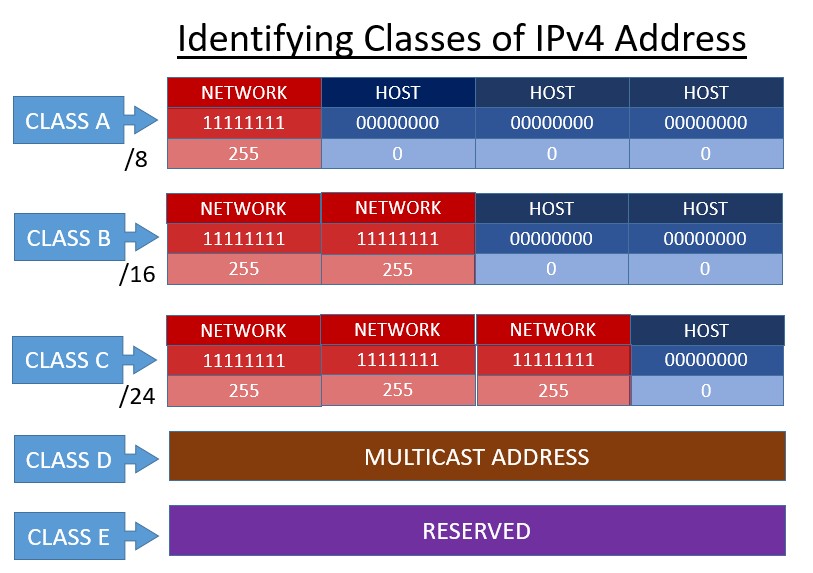
IP address classes are an older way of dividing IPv4 addresses into groups based on the size of the network and the number of hosts it can support. The class of IP address simplifies the address allocation according to the network size.
IPv4 addresses were broadly classified into five classes.
- Class A Address (1 to 126)
- Class B Address (128 to 191)
- Class C Address (192 to 223)
- Class D Address (224 to 230)
- Class E Address (240 to 255)
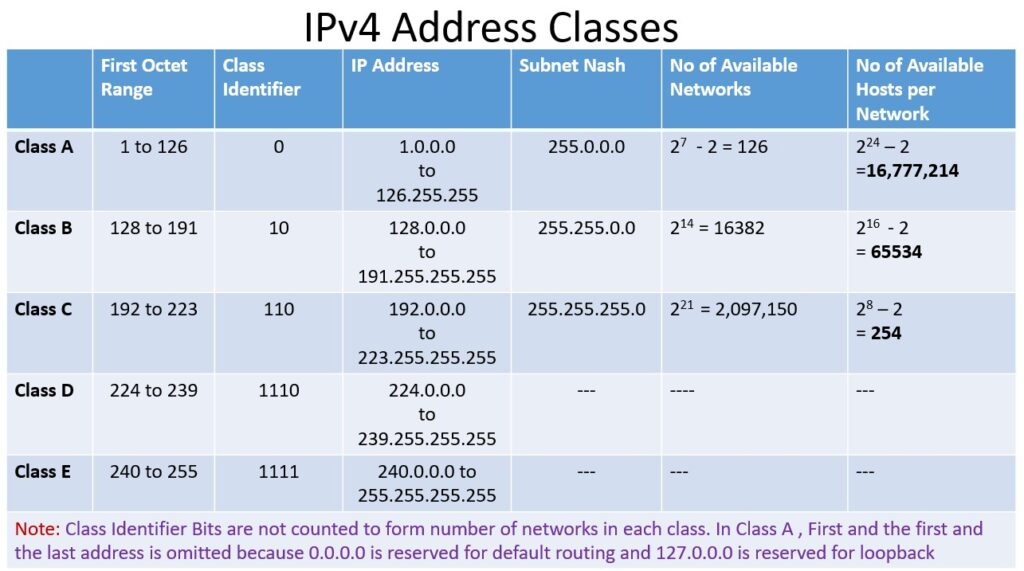
Class A Address
- Class A IP addresses are designed for very large networks that need a very large number of host devices.
- The first octet of a Class A address ranges from 1 to 126.
- The default subnet mask for Class A is 255.0.0.0 (or /8).
- The first 8 bits represent the network portion of the address, and the remaining 24 bits represent the host portion of the address.
- A Class A network can support up to 16,777,214 hosts on a single network. ((224 – 2) = 16,777,214)
- The address range for Class A is 1.0.0.0 to 126.255.255.255.
- The address 127.x.x.x is reserved for loopback testing and is not used as a Class A network address.
- Class A addresses were typically assigned to large organizations, governments, and multinational companies.
- Class A private address ranges from 10.0.0.0 to 10.255.255.255.
- In modern networks, Class A addressing has largely been replaced by CIDR and subnetting, but the concept is still taught for understanding IP addressing fundamentals.
Class B Address
- Class B IP addresses are designed for medium- to large-sized networks, such as universities, large companies, and government organizations.
- The first octet of a Class B address ranges from 128 to 191.
- The first two bits of a Class B address are always 10, and it is called the “class identifier.”
- The default subnet mask for Class B is 255.255.0.0 (/16).
- The first 16 bits represent the Network ID, which identifies the network. The remaining 16 bits represent the Host ID, which identifies devices within that network.
- A Class B network can support up to 65,534 hosts, since two host addresses are reserved (network address and broadcast address). ((216 -2) = 65,534)
- The address range for Class B is 128.0.0.0 to 191.255.255.255. There are 16,384 possible Class B networks, because only 14 bits are available for network numbering.
- A common private Class B address range is 172.16.0.0 to 172.31.255.255.
- Class B addresses provide a balance between the large size of Class A networks and the smaller size of Class C networks.
- In modern networking, Class B is largely replaced by CIDR and subnetting, but it remains important for understanding IP addressing fundamentals.
Class C Address
- Class C IP addresses are designed for small networks, such as small businesses, schools, and home networks.
- The first octet of a Class C address ranges from 192 to 223.
- The first three bits of a Class C address are always 110.
- The default subnet mask for Class C is 255.255.255.0 (/24).
- The first 24 bits represent the Network ID, which identifies the network. The remaining 8 bits represent the Host ID, which identifies devices within the network.
- A Class C network can support up to 254 hosts because two addresses are reserved: one for the network address and one for the broadcast address.
- The address range for Class C is 192.0.0.0 to 223.255.255.255.
- There are over 2 million possible Class C networks, making it suitable for many small organizations.
- A common private Class C address range is 192.168.0.0 to 192.168.255.255.
- Class C addresses were the most commonly used class for local area networks (LANs).
- Today, CIDR and subnetting have replaced class-based addressing, but Class C remains important for learning networking concepts.
Class D Address
- Class D IP addresses are used for multicast communication.
- The first octet of a Class D address ranges from 224 to 239.
- The first four bits of a Class D address are always 1110.
- Class D addresses do not have a Network ID and Host ID division like Classes A, B, and C.
- Class D addresses are not assigned to individual devices such as computers, printers, or servers. Instead, they identify a multicast group, which is a collection of devices interested in receiving the same data.
- Multicasting allows one sender to transmit a single stream of data to multiple receivers simultaneously. This reduces network bandwidth usage because the sender does not need to send separate copies of the same data to each receiver.
- Class D addresses are commonly used for video conferencing, live streaming, online training, and routing protocol updates.
- The address range for Class D is 224.0.0.0 to 239.255.255.255.
- There is no default subnet mask for Class D addresses because they are not used for host addressing.
- Modern networks still use multicast addressing, making Class D addresses important for efficient group communication.
Class E Address
- Class E IP addresses are reserved for experimental and research purposes.
- The first octet of a Class E address ranges from 240 to 255.
- The first four bits of a Class E address are always 1111. Class E addresses are not used for normal host communication on the Internet.
- Unlike Classes A, B, and C, Class E addresses are not assigned to networks or individual devices.
- The address range for Class E is 240.0.0.0 to 255.255.255.255.
- There is no default subnet mask for Class E addresses because they are reserved and not intended for regular networking.
- These addresses were set aside by the Internet Protocol designers for future use, testing, and experimentation.
- Most operating systems and networking equipment do not support Class E addresses for standard communication. Because they are reserved, Class E addresses are generally blocked by routers and Internet service providers.
- The address 255.255.255.255 within this range is a special address known as the limited broadcast address.
- Class E addresses remain reserved today and are rarely encountered in everyday networking environments.
Concept of Subnetting
As computer networks grew larger, managing all devices within a single network became difficult. Early IPv4 addressing used fixed address classes (Class A, B, and C), which often led to inefficient use of IP addresses. Large organizations received more addresses than they needed, while smaller organizations sometimes did not receive enough.
To solve these problems, subnetting was introduced. Subnetting allows a network to be divided into smaller logical networks (subnets) by borrowing bits from the host portion of an IP address. This approach helps conserve IPv4 addresses, reduces network congestion caused by broadcast traffic, improves security by separating different groups of devices, and makes network administration more efficient.
In short, subnetting evolved to address the limitations of large, flat networks and to ensure more efficient use of the limited IPv4 address space.
What is Subnetting?
Subnetting is the process of dividing a large IPv4 network into smaller, more manageable networks called subnets. It helps network administrators organize networks efficiently and use IP addresses more effectively.
Why is Subnetting Needed?
- Efficient Use of IP Addresses: Without subnetting, organizations may waste many IP addresses. Subnetting allows networks to be divided according to actual requirements.
- Improved Network Performance: Smaller subnets reduce broadcast traffic. Fewer devices receive broadcast messages, which improves network speed and efficiency.
- Better Security: Different departments or groups can be placed in separate subnets. This limits unauthorized access and helps implement security policies.
- Easier Network Management: Administrators can troubleshoot and manage smaller network segments more effectively.
- Reduced Network Congestion: Broadcast traffic is confined within each subnet, preventing unnecessary traffic across the entire network.
Understanding Subnet Masks
Before diving deep into the subnetting in detail, you must know what a subnet mask is.
A subnet mask determines which part of an IP address represents the network and which part represents the host.
For example:
Let us take a Class C IP Address: 192.168.1.100
When written in binary form, it looks like
11000000.10101000.00000001.01100100
The default subnet mask for a Class C address will be 255.255.255.0.
Converting subnet masks into binary form:
11111111.11111111.11111111.00000000
The first 24 bits identify the network, while the last 8 bits identify hosts.
CIDR Notation
CIDR (Classless Inter-Domain Routing) is a compact way of representing a subnet mask. Instead of writing the subnet mask in dotted-decimal format (such as 255.255.255.0), CIDR uses a slash (/) followed by the number of bits used for the network portion.
How CIDR Works
An IPv4 address contains 32 bits. The number after the slash indicates how many of those bits are set to 1 in the subnet mask.
Modern networks commonly use CIDR (Classless Inter-Domain Routing) notation.
Instead of writing a subnet mask, CIDR specifies the number of network bits.
Examples
| CIDR | Subnet Mask |
|---|---|
| /8 | 255.0.0.0 |
| /16 | 255.255.0.0 |
| /24 | 255.255.255.0 |
| /25 | 255.255.255.128 |
| /26 | 255.255.255.192 |
CIDR provides greater flexibility and efficient address allocation compared to traditional class-based addressing.
Subnetting Example
Think of subnetting as breaking one big network into smaller, more manageable networks.
Imagine a company has a network with the address 192.168.1.0/24. This network can support up to 254 devices (computers, printers, phones, etc.). If all devices are placed in the same network, there can be a lot of unnecessary traffic because every device is part of the same broadcast domain.
To organize things better, the network administrator decides to split the network into two smaller networks (subnets).
Before Subnetting
The network is:
- Network Address: 192.168.1.0/24
- Usable IP addresses: 192.168.1.1 to 192.168.1.254
- Broadcast Address: 192.168.1.255
All devices are in one large network.
Applying Subnetting
To calculate number of subnets, the following simple formula is used:
- 2ⁿ = Number of subnets, where n denotes the subnet bits borrowed by the network from the host.
From the above example, two subnets are required to create,
To create two smaller networks, one host bit is borrowed, changing the prefix from /24 to /25.
The original network is now divided into:
First Subnet: 192.168.1.0/25
- Network Address: 192.168.1.0
- Usable IP addresses: 192.168.1.1 to 192.168.1.126
- Broadcast Address: 192.168.1.127
This subnet could be assigned to the Sales department.
Second Subnet: 192.168.1.128/25
- Network Address: 192.168.1.128
- Usable IP addresses: 192.168.1.129 to 192.168.1.254
- Broadcast Address: 192.168.1.255
This subnet could be assigned to the Engineering department.
Why Subnetting Required
Suppose a computer in the Sales department sends a broadcast message. Because Sales and Engineering are now in separate subnets, only devices in the Sales subnet receive that broadcast. Devices in the Engineering subnet are unaffected. This reduces network congestion and improves performance.
Subnetting also makes networks easier to manage. Different departments, floors, or buildings can be placed in different subnets, making troubleshooting and security policies much simpler.
You will learn subnetting in detail in next topic.
Conclusion
IPv4 addressing remains one of the most fundamental concepts in computer networking. Despite the emergence of IPv6, IPv4 continues to power a significant portion of today’s internet infrastructure. Understanding IP addresses, their structure, address classes, and subnetting techniques provides a strong foundation for anyone pursuing networking, system administration, cybersecurity, or cloud computing.
Subnetting, in particular, is a critical skill that enables efficient IP address management, improved network performance, and enhanced security. As organizations continue to expand their networks, a solid grasp of IPv4 addressing and subnetting remains an essential requirement for modern IT professionals.