In this tutorial, you’ll learn the two types of addresses—network address and broadcast address. How they are calculated and the importance of these addresses.
Introduction
In computer networking, each device on a network is assigned an IP address, but not all IP addresses are meant for individual devices. Some addresses have special purposes—specifically, the network address and the broadcast address.
The network address is used to identify an entire network. On the other hand, the broadcast address is the last address in a given IP range. used for broadcasting a message to all the nodes in a network.
Together, these two addresses play an essential role in network communication and management. Understanding them is a key step in learning how networks are structured and how devices efficiently exchange information.
What is a Network Address?
The network address is used to identify an entire network. It represents the starting point of a group of IP addresses and helps routers and systems recognize which network a device belongs to. This address is not assigned to any single device because it serves as a label for the whole network.
How to Calculate a Network Address
The network address is calculated using a bitwise AND operation between the IP address and the subnet mask.
Follow the steps given below to calculate the network address.
Let us understand with the help of an example.
Step 1: Let’s take an IP address, 192.168.1.10/24.
We need both the IP address and the subnet mask to calculate the network address. We already have IP address 192.168.10, but the subnet mask is in CIDR notation, i.e., /24 (read as “slash twentyfour”). That means 24 bits are used for the network portion.
Step 2: Convert both IP address and subnet mask to binary form
| Type | Decimal | Binary |
|---|---|---|
| IP Address | 192.168.1.10 | 11000000.10101000.00000001.00001010 |
| Subnet Mask | 255.255.255.0 | 11111111.11111111.11111111.00000000 |
Step 3: Perform a bitwise AND operation between the IP address and the subnet mask.
IP Address:         11000000.10101000.00000001.00001010
Subnet Mask:        11111111.11111111.11111111.00000000
_______________________________________________________
AND Operation:      11000000.10101000.00000001.00000000
Step 3: Convert them back to decimal.
 ANDing Result        11000000.10101000.00000001.00000000

Decimal Equivalent     192.168.1.0
Network Address = 192.168.1.0
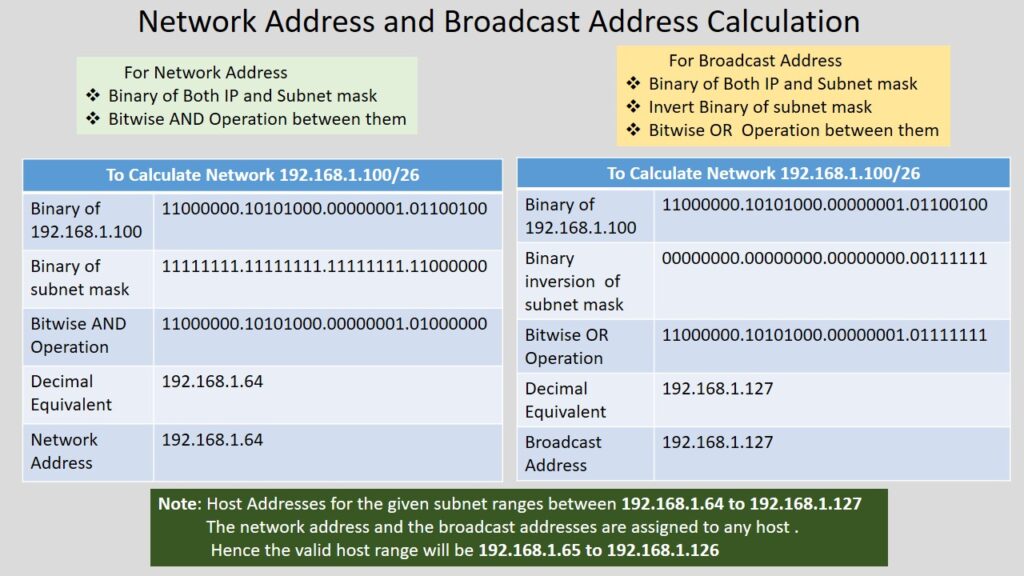
Let us take another example, this time with a different IP address 192.168.1.100/26.
- IP Address —> 192.168.1.100 —> 11000000 . 10101000 . 00000001 . 01100100
- Subnet mask —> /26 —-> 11111111 . 11111111 . 11111111 . 11000000
And operation between them
IP Address:         11000000.10101000.00000001.01100100
Subnet Mask:        11111111.11111111.11111111.11000000
_______________________________________________________
AND Operation:      11000000.10101000.00000001.0100000
Decimal Eqivalent: 192.168.1.64
Hence, the network address for 192.168.1.100/26 will be 192.168.1.64
Note: Remember, the last octet of a network address cannot always be zero. It can be zero for the first subnet.
What is a Broadcast Address?
A broadcast address is the last IP address in a network range. It is used to send data to all devices within the same network at the same time.
Instead of sending a message to one specific device, a broadcast address allows a device to communicate with every host on the network simultaneously—like making an announcement that everyone can hear.
How to Calculate a Broadcast Address
The broadcast address is calculated using a bitwise OR operation between the IP address and the subnet mask.
Follow the steps given below to calculate the network address.
Step 1: Let’s take an IP address, 192.168.1.10/24.
We need both the IP address and the subnet mask to calculate the broadcast address. We already have IP address 192.168.10, but the subnet mask is in CIDR notation, i.e., /24 (read as “slash twentyfour”). That means 24 bits are used for the network portion.
Step 2: Convert both IP address and subnet mask to binary form
| Type | Decimal | Binary |
|---|---|---|
| IP Address | 192.168.1.10 | 11000000.10101000.00000001.00001010 |
| Subnet Mask | 255.255.255.0 | 11111111.11111111.11111111.00000000 |
Step 3 : Invert the subnet mask.
Subnet mask after inversion : 00000000 . 00000000 . 00000000 . 11111111Step 4: Perform a bitwise OR operation between the IP address and the inversion of subnet mask to calculate the broadcast operation.
IP Address:         11000000 . 10101000 .00000001 . 00001010
Subnet Mask:        00000000 . 00000000 .00000000 . 11111111
_______________________________________________________
OR Operation:      11000000 . 10101000 . 00000001. 1111111
Decimal Equivalent: 192.168.1.255
Hence, the broadcast address for 192.168.1.10/24 will be 192.168.1.255.
Let us take another example, this time with a different IP address 192.168.1.100/26.
- IP Address —> 192.168.1.100 —> 11000000 . 10101000 . 00000001 . 01100100
- Subnet mask —> /26 —-> 11111111 . 11111111 . 11111111 . 11000000
- After Inversion of subnet mask —> 00000000 . 00000000 . 00000000 . 00111111
OR operation between them
IP Address:            11000000.10101000.00000001.01100100
Inversion of mask :    00000000.00000000.00000000.00111111
_______________________________________________________
OR  Operation:        11000000.10101000.00000001. 0111111
Decimal Eqivalent: 192.168.1.127
Hence, the network address for 192.168.1.100/26 will be 192.168.1.127
Note: Remember, the last octet of a broadcast address cannot always be 255. It can be 255 for the last subnet.
Thanks for sharing this useful information.
Great article, very helpful!
Very informative and easy to understand.
This really helped me a lot.
This is exactly what I was looking for.
This guide explained everything clearly.
Very informative and easy to understand.
This really helped me a lot.
This guide explained everything clearly.
Keep up the great work.
this is actually interesting, this solved something i was stuck on. i might explore more here.