Introduction
Network topology architecture is referred to as the overall design and structure of a network that shows how devices like routers, switches, servers, and end-point systems are connected and how they communicate with each other.
It is the blueprint of the network that tells you how every devices from the high end routers in the server room to the laptop on your desk, is connected so that they can actually talk to each other.
Generally, network topology includes two main parts.
- The first is the physical topology, which describes the actual layout of devices and cables, how everything is physically connected.
- The second is the logical topology, which explains how data travels across the network, regardless of the physical connections.
Characteristics of Network Topology Architectures
The network topology architecture emphases on the following features that make the network more reliable, scalable, and robust.
- Reliability: A well-designed network can function diligently even if a device or connection fails. The redundant devices and channels are arranged for hot standby backup.
- Scalability: The design of the network should be scalable for future growth of the network to a larger size. New devices or users can be added without making major modifications to the existing design.
- Performance: An appropriate topology according to the network demand allows data to traverse quickly and efficiently, thus reducing latency and avoiding traffic congestion.
- Manageability: The network should be easily manageable for network administrators to monitor the system, troubleshoot, and make any changes when needed.
- Cost-effectiveness: The design of the network should make the best use of resources to provide great performance without spending too much on equipment or making things too complicated.
- Security: A proper topology helps control how data flows in the network and reduces the chances of unauthorized access.
2-Tier Architecture
A two-tier architecture is a simple way of designing a network where devices are organized into two distinct layers. It simplifies the traditional 3-tier model by combining core and distribution layers into single collapsed layer, making it ideal for small to medium-sized networks.
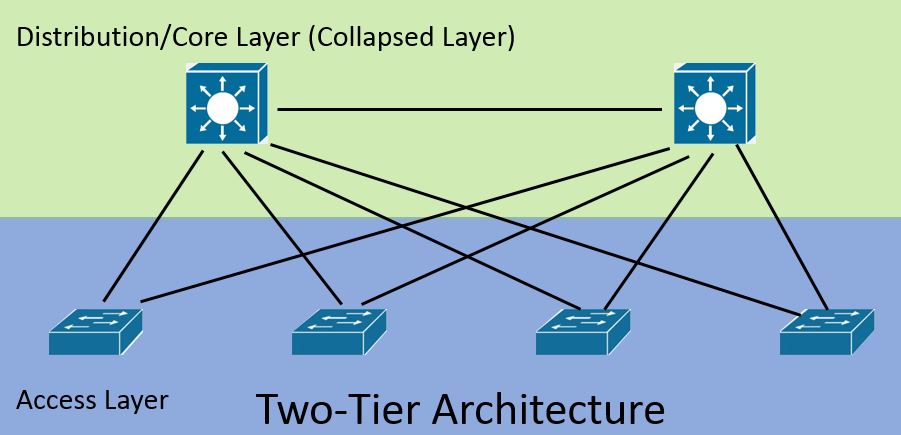
The two distinct layers of two tier architecture are:
- Access Layer: This is the layer where end devices like computers, printers, and IP phones connect to the network. Switches at this level provide access to users and handle basic tasks like forwarding data. It assigns devices to VLANs for logical segmentation of the network and implements security features like port security to control device access. It mainly uses Layer 2 switches for forwarding data within the same network.
- Distribution/Core Layer (Collapsed Layer): In two-tier architecture the distribution and core layer combine to form a Collapsed layer and acts as the backbone of the network by connecting multiple access layer switches. It performs inter-VLAN routing to enable communication between different VLANs. It also handles routing functions, network policies such as access control lists (ACLs) and quality of service (QoS). It typically uses Layer 3 switches or routers to handle both switching and routing functions and ensures fast and reliable data forwarding across the network.
3-Tier Network Architecture
A 3-tier architecture is a structured way of designing a network by dividing it into three different layers. It is commonly used in medium to large networks because it improves performance, makes management easier, and supports future growth.
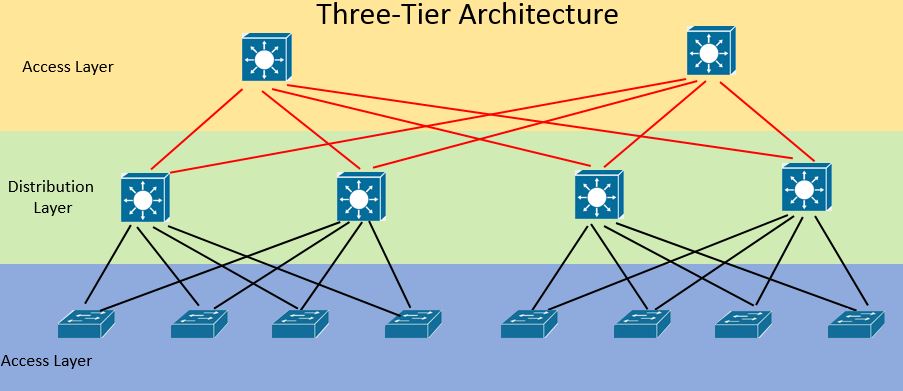
The three layers are:
- Access Layer: This is the lowest layer where end devices like computers, laptops, printers, and IP phones connect to the network. It mainly provides user access and allows devices to send and receive data. It assigns VLANs to organize devices into logical groups and enforces basic security features like port security and MAC address filtering. The access layer mainly uses Layer 2 switches for local data forwarding.
- Distribution Layer: The distribution layer is the middle layer which acts as an intermediary between the access layer and the core layer. It performs inter-VLAN routing to enable communication between different VLANs, applies policies such as access control lists (ACLs) and quality of service (QoS). In addition to that, it also aggregates multiple access layer switches into a single point of control and provides redundancy and load balancing for better network reliability.
- Core Layer: This is the top layer and works as the high-speed backbone of the entire network. Its main job is to move data quickly and efficiently between different distribution layers. It focuses on speed and reliability rather than complex processing. It typically uses high-performance Layer 3 switches or routers.
Spine-Leaf Architecture
Spine-leaf architecture is a modern network design mainly used in data centers. It is built to handle large amounts of data traffic with high speed and low delay. Instead of using a traditional layered approach, this design creates a more direct and predictable path for data.
In this architecture, there are two main parts:
- Leaf Layer: The leaf layer connects directly to end devices such as servers, storage systems, and sometimes user networks. It acts as the access layer of the data center network. Each leaf switch connects to all spine switches for maximum redundancy. It handles traffic entering and leaving the network. It can also perform routing and switching functions depending on the design of the network.
- Spine Layer: The spine layer acts as the backbone of the network by interconnecting all leaf switches. It is responsible for high-speed data transport between leaf switches. It ensures low latency by offering predictable paths for data transmission. The spine layer typically uses high-performance switches optimized for fast forwarding.
WAN Architecture
WAN (Wide Area Network) architecture refers to the design used to connect networks that are far apart, such as different cities, regions, or even countries. It allows communication between branch offices, data centers, and remote users over long distances.
WAN covers the larger geographical area. It has to depend on service providers (like telecom companies) to carry data across these large areas. The main goal of WAN architecture is to provide reliable, secure, and efficient communication between distant locations.
Types of WAN Architecture
WANs can be designed in different ways depending on how locations are connected:
- Point-to-Point WAN: This is the simplest type where two locations are directly connected with a dedicated link. It is reliable and easy to understand, but it can be costly if many locations need to be connected.
- Hub-and-Spoke (Star) WAN: In this design, all branch offices connect to a central site (hub). Communication between branches usually goes through the hub. It is easier to manage but may create a bottleneck at the central location.
- Full Mesh WAN: Every site is connected to every other site. This provides high reliability and multiple paths for data, but it is expensive and complex to maintain.
- Partial Mesh WAN: Only some important locations are fully connected, while others have limited connections. This balances cost and performance.
- VPN-based WAN: This type uses the internet to connect different sites securely using encrypted tunnels. It is cost-effective and widely used today.
SOHO (Small Office / Home Office)
SOHO stands for Small Office/Home Office. SOHO architecture is a basic network design used in small environments like homes, small businesses, or startup offices. It is designed to be simple, low-cost, and easy to set up without needing advanced technical skills.
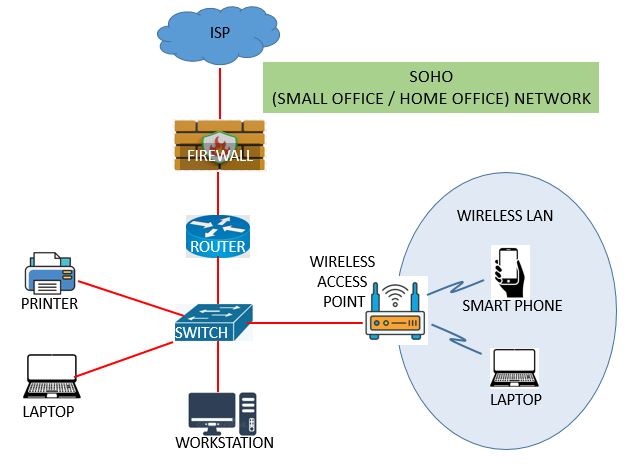
In a SOHO network, a few devices such as computers, laptops, printers, and smartphones are connected using a single router or a combination of a router and a switch. This router usually handles multiple tasks like internet access, basic security, and device connectivity all in one place.
The main goal of SOHO architecture is to provide reliable internet access and simple communication between devices without making the network too complex.
Types of SOHO Architecture
SOHO networks can be set up in different ways depending on the size and need:
- Wired SOHO Network: In this type, all devices are connected using Ethernet cables. It provides stable and fast connections but can be less flexible due to physical wiring.
- Wireless SOHO Network: Devices connect using Wi-Fi instead of cables. It is easy to set up and allows mobility, but performance may vary depending on signal strength.
- Hybrid SOHO Network: This is a mix of both wired and wireless connections. Important devices may use cables for stability, while others use Wi-Fi for convenience.
- Single-Router SOHO Setup: A single device (wireless router) handles everything—routing, switching, and security. This is the most common and simplest setup.
- Extended SOHO Setup: In slightly larger spaces, additional devices like switches or access points are added to extend coverage and support more users.
On-Premises and Cloud Architecture
On-Premises Architecture
In this setup, all network devices, servers, and data are stored and managed within the organization’s own physical location, such as an office or data center. The company has full control over the hardware, security, and configuration. It is reliable and secure but can be expensive to set up and maintain.
Types of On-Premises Architecture
- Traditional On-Premises:
All systems are installed and managed locally within the organization. Everything from servers to storage is physically present on-site. - Virtualized On-Premises:
Physical hardware is used, but multiple virtual systems run on it. This improves resource usage and flexibility.
Cloud Architecture
In cloud architecture, data and applications are stored on remote servers that are managed by cloud service providers. These services are accessed through the internet. It reduces the need for physical hardware and allows easy access from anywhere, but it depends on internet connectivity.
Types of Cloud Architecture
- Public Cloud: Services are provided over the internet and shared among multiple users. It is cost-effective and easy to scale.
- Private Cloud: Cloud services are used by only one organization. It offers better control and security but can be more expensive.
- Hybrid Cloud: This is a mix of on-premises and cloud systems. Some data stays local while other services run in the cloud.
- Multi-Cloud: Multiple cloud providers are used together. This avoids dependency on a single provider and increases flexibility.